
PayByPlateMA is the Massachusetts toll payment system for vehicles without a valid E-ZPass transaction.
PayByPlateMA is Massachusetts’ invoice-based option for collecting cashless tolls from vehicles that do not have a valid E-ZPass transponder. Cameras record the vehicle’s license plate at a tolling location, and an invoice is mailed to the registered owner.
This guide explains how Pay By Plate MA works, how to pay an invoice through official channels, how it differs from E-ZPass, what to do if an invoice is missing or incorrect, and how to avoid toll-payment scams.
What is PayByPlateMA?
Pay By Plate MA is part of EZDriveMA, the Massachusetts electronic tolling program administered through the Massachusetts Department of Transportation. It allows tolls to be assessed without cash booths or a transponder.
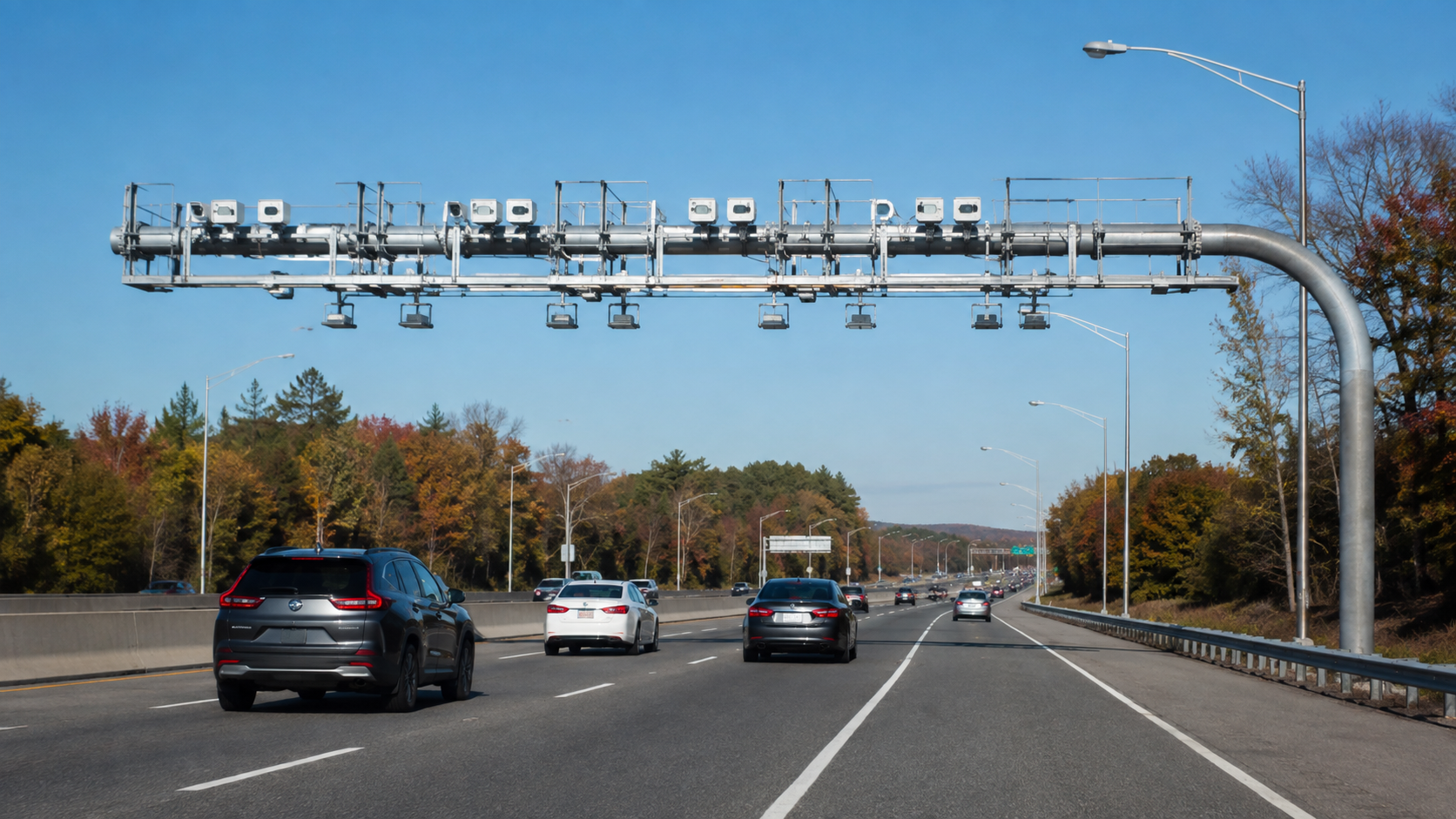
When a vehicle passes beneath an electronic tolling gantry, cameras capture images of the license plate. The plate is matched with motor-vehicle registration records, and a bill is sent to the registered owner. The invoice includes the toll transactions, amount due, due date and payment instructions.
Pay By Plate is convenient for occasional users, rental vehicles and drivers without E-ZPass, but it generally costs more than using a properly mounted and funded E-ZPass transponder.
How Pay By Plate MA works
- The vehicle passes through a Massachusetts cashless tolling point.
- The system checks for a valid electronic toll transponder.
- If no valid transponder transaction is completed, cameras photograph the license plate.
- Registration information is used to identify the vehicle’s registered owner.
- A Pay By Plate MA invoice is mailed to the address connected with the registration.
- The recipient pays through an official online service, by mail or at an authorized Customer Service Center.
The process depends on accurate registration records. Drivers should keep their mailing address current with their motor-vehicle authority, especially after moving.
Official ways to pay a PayByPlateMA invoice
The Commonwealth of Massachusetts lists three main payment methods: online, by mail and at an EZDriveMA Customer Service Center. Start from the official EZDriveMA page on Mass.gov rather than using a payment link received through an unexpected message.
Pay online
- Open the official EZDriveMA page on Mass.gov.
- Select the option to pay a Pay By Plate MA invoice.
- Enter the identifying information requested from the invoice.
- Review the plate, transactions and amount carefully.
- Complete payment using an accepted method.
- Save the confirmation number or receipt.
Type the official address yourself or use Mass.gov. Sponsored search results and look-alike domains can be misleading.
Pay by mail
Follow the instructions printed on the invoice. Include the correct payment slip and identifying details, and send it to the address shown on the current bill. Allow sufficient delivery and processing time before the due date.
Do not send cash. Keep a copy of the invoice and proof of payment.
Pay at a Customer Service Center
EZDriveMA Customer Service Centers can help with invoices and accounts. Check the official website for current locations, opening hours, appointment information and accepted payment types before traveling.
What information is needed to pay?
The invoice provides the information required to locate the bill. Depending on the official payment screen, this may include the invoice or notice number and vehicle information. Enter details exactly as printed, including the plate jurisdiction.
If you no longer have the invoice, do not guess payment credentials or provide personal details to an unofficial site. Contact EZDriveMA through the contact information published on Mass.gov.
PayByPlateMA fees and toll rates
Massachusetts states that a fee of $0.60 applies to each Pay By Plate MA invoice. Pay By Plate toll rates can also be higher than E-ZPass MA rates. The precise toll depends on the roadway, gantry, vehicle class and payment method.
Review the current official Massachusetts toll-payment options and the transactions printed on the invoice. Fees and toll schedules can change, so do not rely on an old blog post or screenshot for the final amount.
PayByPlateMA vs E-ZPass MA
| Feature | Pay By Plate MA | E-ZPass MA |
|---|---|---|
| Identification | License-plate images | Electronic transponder |
| Payment timing | Invoice after travel | Charged through the account |
| Invoice fee | May apply | No Pay By Plate invoice fee for normal transponder transactions |
| Toll rate | Generally higher | Typically lower on Massachusetts toll roads |
| Best for | Occasional drivers without a transponder | Regular toll-road users |
A transponder must be correctly mounted, associated with the right plate and connected to an account in good standing. If the transponder is not read, the system may use the license plate and account information to process the trip according to applicable rules.
Can you create a registered Pay By Plate account?
Massachusetts provides a Pay By Plate MA registered account option that is valid on MassDOT roadways. Account features and eligibility may differ from E-ZPass. Review the official EZDriveMA information before choosing an account type, particularly if you travel outside Massachusetts.
E-ZPass has broader interoperability across participating toll agencies, while a Massachusetts plate-based account is tied to the vehicle and applicable MassDOT facilities.
What if the invoice does not arrive?
Not receiving the letter does not necessarily erase the toll. Mail can be delayed, registration information may be outdated or the invoice may have gone to a previous address.
If you used a Massachusetts toll road without a valid transponder and expect a bill, contact EZDriveMA through the official Mass.gov page. Have the plate number, jurisdiction, approximate travel date and vehicle information available, but share personal information only through verified channels.
What if the invoice is incorrect?
Review every transaction, including the plate image where available, vehicle class, date, time and location. Possible issues include a misread plate, a recently sold vehicle, duplicate-looking transactions or incorrect classification.
Follow the dispute or appeal instructions on the invoice and contact EZDriveMA promptly. Useful evidence can include:
- A copy of the invoice
- Vehicle registration information
- A bill of sale or transfer record
- Police or insurance documentation for a stolen plate
- Travel records showing the vehicle was elsewhere
- An E-ZPass statement if a transponder account should have covered the trip
Do not ignore the invoice while investigating. Observe the stated deadline and use the formal review process.
What happens if PayByPlateMA is not paid?
An unpaid invoice can progress to additional notices, fees or enforcement under applicable Massachusetts rules. Continuing to ignore a balance can make the matter more expensive and may affect vehicle-related transactions.
Pay or dispute the invoice by the date shown. If the balance is already overdue, use the official EZDriveMA contact details to confirm the current amount and available resolution process.
Rental cars and Pay By Plate MA
For a rental vehicle, the invoice normally goes to the registered owner, which is the rental company. The company may then charge the renter for tolls plus administrative or service fees under the rental agreement.
Before driving on toll roads, review the rental company’s toll policy. Some companies provide a transponder or toll program, while others bill after the trip. Keep the rental contract and return receipt until all toll charges are settled.
Out-of-state vehicles
Vehicles registered outside Massachusetts can still receive toll charges. The billing and collection process may depend on registration data and agreements between jurisdictions.
Out-of-state drivers should not assume a bill will be waived. Use the instructions on the official invoice or contact EZDriveMA if the vehicle information or amount appears incorrect.
How to recognize PayByPlateMA scams
MassDOT has warned customers about EZDriveMA scam messages. Its public warning states that EZDriveMA will never request payment by text. Unexpected messages claiming that an urgent toll balance must be paid through a link should be treated as suspicious.
- Do not click links in unexpected toll-payment texts.
- Do not reply with plate, account, card or identity information.
- Open Mass.gov independently and navigate to EZDriveMA.
- Compare the claim with an invoice or account reached through the official site.
- Contact the official customer service number shown on Mass.gov when uncertain.
- Report and delete fraudulent messages after preserving any needed evidence.
MassDOT’s published customer service number is 877-627-7745, but verify it on the current MassDOT scam-alert page before calling.
Common problems and solutions
The website cannot find the invoice
Check every character, the plate state or jurisdiction and the invoice number. A recently issued bill may not yet be available. Use official customer service rather than repeatedly entering information on other websites.
The vehicle was sold
Gather the bill of sale and registration-transfer records. Follow the invoice dispute instructions and notify the motor-vehicle authority if ownership records were not updated.
The transponder account was active
Compare the toll date with the account statement, plate list, payment method and transponder status. Contact EZDriveMA with the invoice and account details.
The plate was stolen or copied
Report a stolen plate to the appropriate authority and retain the report. Use the formal invoice-review process and provide the requested evidence.
How to avoid future Pay By Plate invoices
- Open and maintain a valid E-ZPass account if you regularly use toll roads.
- Mount the transponder according to its instructions.
- Keep the vehicle plate and payment method current on the account.
- Maintain sufficient funds or a working replenishment method.
- Update vehicle-registration and mailing addresses promptly.
- Review account statements so errors are identified early.
Frequently asked questions
Is PayByPlateMA legitimate?
Yes. Pay By Plate MA is an official Massachusetts toll-payment method within EZDriveMA. Scam websites and messages can imitate its name, so begin from Mass.gov.
Can I pay a PayByPlateMA invoice without an E-ZPass account?
Yes. Pay By Plate is intended for plate-based toll invoices and does not require an E-ZPass transponder account.
Can I pay by phone?
The official Massachusetts payment-options page emphasizes online payment, mail and Customer Service Centers. Contact EZDriveMA using the verified number on Mass.gov for assistance, but do not assume that an unsolicited caller or text can accept payment.
Why is Pay By Plate more expensive?
Plate imaging, registration matching, invoicing and collection involve additional administration. Massachusetts also uses different toll rates for some payment methods, and an invoice fee applies.
Where is the safest place to start?
Use Mass.gov’s EZDriveMA page. It provides official links for paying invoices, managing accounts, finding service centers and obtaining assistance.
Final takeaway
PayByPlateMA lets Massachusetts collect cashless tolls from vehicles without a valid E-ZPass transaction. The registered owner receives an invoice that can be paid online, by mail or through an official service center. Paying by the due date, keeping registration details current and starting from Mass.gov will reduce fees, delays and scam risk.
This independent guide is not affiliated with MassDOT or EZDriveMA. Toll rates, fees, procedures and contact details can change. Verify current information through Mass.gov before paying.
PayByPlateMA Account and Invoice Checklist
Before submitting any payment, confirm the plate number, state, invoice number and due date on the official PayByPlateMA portal. Type the official address yourself or begin at Mass.gov, and never use a payment link from an unexpected text message.
For more practical online-service help, browse our technology guides. If a slow connection interrupts an online transaction, our guide to testing internet speed and buffering explains useful connection checks.
Toll Payment Safety Checklist
Complete a toll payment only through the official portal after checking the invoice details and due date.